Tuesday, 24 January 2017

Unit 13- Understanding the Games Industry-Financial Issues

In this report I will be writing about the financial issues that affect the games industry and why games can sell well or badly.

The costs involved in creating games:
There are several costs that go into creating video games. These include: staff wages, the development of hardware and software, rent and bills, marketing and advertising and finally legal issues such as copyright and PEGI ratings. Other costs could involve, creating peripheral equipment and supporting multiple languages, regions and platforms.
Examples of successful and unsuccessful games: The Witcher 3: Wild Hunt was an incredibly successful game, having sold around 10 million copies since its release. In the first six weeks of its release, the company make a profit of $62.5 million. It was successful due to its captivating story, incredibly well-detailed graphics, finely tuned(albeit somewhat clumsy) combat system and lovable characters. Another reason was that people felt they got their money's worth when purchasing the game and its subsequent expansions. It also helped that CDPR had a very good marketing strategy, as well as the game winning over 200 awards before its release. This in turn generated large amounts of hype, thus increasing overall sales.
Grim Fandango was a critical success when first released in 1998, receiving positive reviews and awards. It also initially sold well during late 1998. However, the release of other titles, chiefly Half-Life, Metal Gear Solid and The Legend of Zelda: Ocarina of Time, forced Grim Fandango out of the spotlight. It also did not help that the point-click adventure games were not popular at the time. It is believed that the game has sold between 100,00 and 500,000 copies, although it did eventually make a profit.

How a game can be funded:
There are a few different ways that a game can be funded, in the following ways.
The first is for a developer to fund the game entirely by his/herself. The advantages of self funding are: financial independence, which allows the developers to choose where their money is spent, and creative independence: which means that developers can choose the artistic direction in which they want their game to go, without interference from a publisher. The chief disadvantage is that the budget is usually quite small, resulting in the games sometimes being fairly limited when it comes to graphics, gameplay and level design. However, many independent developers pool together resources, which negate these effects somewhat. Another disadvantage is that it is quite easy for developers to go over-budget, due to unforeseen complications, such as licensing fees, marketing/publishing and the game being held back. This leads on to the second way of financing games; bank loans.
The second form of funding is by way of loans. The main advantage is that it can be a huge boost to a fledgling developers finances and allow them to complete the game properly, sometimes with increased game mechanics due to more money. However, the one really big disadvantage is that banks are hesitant to loan money to people who are financially unstable. Game developers have some incredibly inconsistent cash flows that often scare banks away, as they require money to be paid back when they want it, not in a couple of years when the game is released and the cash is (hopefully) rolling in.
The third way of funding is to get potential investors and publication companies involved in the process. The main advantage is, of course, the increased money flowing into the game. Also these people are usually more lenient when it comes to paying back the money. Independent investors and publishers often invest money in return for shares or a percentage of the overall profit. The disadvantages are that it can be hard for new developers to gain the confidence of investors and publishers and when they do, it is often the case that the developer does not actually see any profit being made until well after the release of the game. This is due to the fact that investors and publishers almost always end up paying for many of the developers costs and take their cut when the game is released, until they break even and start making a profit. Then the developers start seeing some hard cash. Also, publishers often have a say in how the game is made.
The fourth and final way is via crowdfunding. This is a relatively new way to fund games and involves people willingly donating any sum of money to the developers, whether these are completely new developers or existing and solid companies in need of some extra cash. The advantages are that huge amounts of money can be raised, sometimes exceeding the original amount asked for. In turn this allows developers to increase the overall content of the game, from gameplay and graphics to level design and better sound. However, the bad side is that a lot of games take years to create and failed projects can do irreparable damage to your reputation, a reputation that may have taken a long time to build up. It is also necessary to gain interest in your game, something that can take a lot of man-hours to do.

Issues facing small and indie studios:
The main problem for small studios is that it is incredibly difficult for unknown studios to gain the amount of funding necessary, and even more difficult to gain the attention of publishers willing to take the risk and publish potential failures. With regard to the banks, they look at your cash flows and see how much your overall property is worth if it becomes collateral. This can instantly ruin many developers chances of gaining a loan, due to the unstable financial side of fledgling developers. Also, the cash is going to becoming in fastest within the months after the games release, thus meaning that it could take years before any money is seen, which can put off many investors, publishers and banks.

Conclusion:
Overall, I have talked about the financial aspects and issues that all game developers (big or small) face at some point in their lives, from wages, bills, software and hardware development, to marketing, advertising, copyright and licensing costs.
To conclude, I have learnt that if you want to become a game developer, only do so if you have a stable cash flow coming into the studio, otherwise you may be out of the game.

References:
http://www.gamespot.com/articles/witcher-3-ships-almost-10-million-copies-report/1100-6435592/
http://www.gamerevolution.com/news/the-witcher-3-has-won-more-game-of-the-year-awards-than-any-other-game-36313
http://www.escapistmagazine.com/articles/view/video-games/issues/issue_139/2994-Walk-Don-t-Run
https://www.nibusinessinfo.co.uk/content/advantages-and-disadvantages-crowdfunding

Friday, 14 October 2016

The Advantages and Disadvantages of Gaming Platforms
Mobile Gaming:
Mobile gaming is where a person plays a video game on their mobile phone or tablet computer. It has many advantages, as well as a few disadvantages, as shown described below.
Advantages:
One advantage of mobile gaming is that the games can be taken anywhere. Once the game is downloaded on the phone, it can be played whenever, even without an Internet or phone signal.
Another advantage is cost, as many games on app stores are either free or very cheap. This allows gamer's to save money or try out many different games. Also, people will usually already have their phones before they buy the game, compared to computers or consoles, as users will have to spend a few hundred pounds buying the platform.
Creativity. Mobile games are very diverse and ,because they are cheaper and easier to produce, developers can take more of a risk when trying out new ideas and concepts. They don't stand to lose much, as most of the games are free anyway.
Disadvantages:
Constant use of thumbs, fingers, wrists and eyes can lead to RSI, eye strain and other physical problems.
They can take up a lot of time, thus potentially isolating users from friends and family, or stopping them from doing productive tasks or socialising.
Console Gaming:
Console gaming is where people play video games on a home console. There are some advantage sand disadvantages, as shown in the paragraphs below.
Advantages:
Consoles are usually quite cheap, compared to PC's, as they specifically built to be used for gaming, as well as easily accessible. This allows console makers to shed unnecessary costs. Games will also work for the console, on PC you may have to do some tweaking to get it to work.
Socially, consoles still offer great communities for gamer's to play with one another, although Steam and other PC communities are catching up. They are also very good for local multiplayer.
Portability is a very good advantage over PC's, as you can simply disconnect a console, pick it up and reconnect it in a different location.
Disadvantages:
Some game genres are completely absent from console games, as they work much better on PC. Console technology will also be a bit outdated a few years after you buy it, thus meaning you have to buy an entirely new console, as the hardware is locked in consoles.
Arcade Gaming:
Arcade gaming is the use of arcade machines to play simple video games. The disadvantages generally outweigh the advantages. Advantages:
Arcade machines have a wide range of controllers to use, such as guns, joysticks and foot pedals. They are not too costly to produce and make the money back that it cost to make them. 
Disadvantages:
Requires money to be able to play them, thus making them quite costly for players, especially if you play it a lot. They are not as popular as they used to be, which results in fewer people playing them. Also, they are large, taking up lots of space, as well being difficult to move.
PC Gaming:
PC gaming is the use of Home Computers to run video games. The advantages significantly outweigh the disadvantages. Advantages:
Customisation is a big benefit of PC's; the user can choose what type off hardware and software they want, they can surf the web whilst gaming, free online capabilities and online marketplaces such as Steam. They have backwards compatibility with games way back to the 1980's, although a lot of tweaking may be necessary. Hardware can be changed/replaced at will if something goes wrong, without having to buy a completely new PC. There are also many more PC exclusive game titles, compared to other gaming platforms.
Disadvantages:
Quite expensive, especially for higher-end ones, although hardware usually lasts a long time. It is also quite necessary for the user's to be somewhat tech-savvy, due to all the hardware and software, unless the user is happy to pay someone to do it for them, which can be somewhat costly.

Wednesday, 5 October 2016

Unit 78: Digital Graphics for Computer Games.
P1 Understand theory for computer game graphics.

File Extensions:
BMP: BMP(bitmap) files are used to store raster images. It is most commonly used on Microsoft and OS products. The images are stored as pixels and assigned a colour without any compression. This method allows for higher quality images but increases the file size.

GIF: A GIF(Graphics Interchange Format) is a collection of moving bitmaps to create an image or animation, such as sprites. GIF's use lossless compression that does not degrade the quality of the image. However, they can only use indexed colours, meaning standard GIF's can only include 256 colours.

TIFF: A TIFF(Tagged Image File Format) is used to store raster graphic images all in one file and for exchanging raster images from one application to another, most commonly those used for scanning images.

JPEG: A JPEG(Joint Photographic Expertise Group, the company that created it) is the most commonly used method of lossy compression for images produced by digital photography. How compressed the image will be can be adjusted, allowing images to have different degrees of image quality and storage size.

PSD: A PSD(Photoshop Document) is the default format used to save Photoshop data. It allows users to work with the files' individual layers even after the file has been saved. When complete, the image can be flattened and converted into JPEG's or GIF's. However, one the image is converted, it cannot be reverted back to a PSD file, with the user no longer being able to work with the images' layers.

WMF: A WMF(Windows Metafile) is a type of file format designed for Microsoft. They are intended to be portable between Microsoft applications such as PowerPoint, Word and Publisher. It can contain both vector and raster images.

FLA: A FLA(Flash) file is the file used when using Adobe Flash. They store animations or images used with the program, which when saved is converted to an .swf file, these then can be used on the internet.

AI: An AI(Adobe Illustrator) is used in Adobe Illustrator to represent single page vector images in a PDF format.


Compression
Image compression is generally used to reduce the size of the image file and make it easier to store or transmit the data efficiently. There are two most commonly used types of image compression: lossy and lossless compression. Lossy compression is used to reduce data size for storage and transmitting data. The higher the compression, the lower the quality will be. Also, much more data can be reduced using lossy techniques than through lossless techniques. Lossless compression is were the original bits of data are completely restored after decompressing the file, with all the information being restored to its original quality.

Image Capture
Image capture is how an image is taken. This can be done in a number of ways, for example: taking a picture with a DSLR camera, using a camera-phone, or taking a screenshot on the computer.

Optimising
Optimising is were you create a program that works at its maximum efficiency and speed during its execution and storage. This is done to make each program as useful as possible for different platforms, for example, a program written for Windows would have to be optimised to work at its fullest potential on Mac-OS. 

Monday, 3 October 2016

Unit 78: Digital Graphics in Computer Games
Pixels and Resolutions

Image Resolution:
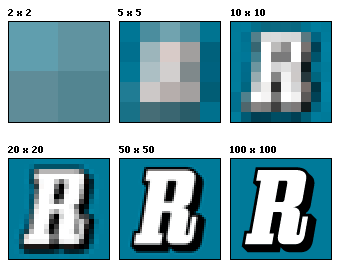
Image result for resolutionImage resolution is, to put it basically, the quality of an image on a screen. As the resolution increases, the image becomes clearer, more defined and more detailed. This is because there is more information in the same space. All screens have image screen resolutions, with a certain number of pixels in that space. If you put more pixels into that space, the higher the resolution will be. The less pixels, the lower the resolution. 
In this example, we see that as the amount of pixels in each square increases, so does the quality of the image. In squares one and two, there are not enough pixels to distinguish what the image might be. With the other squares, the increase in pixels allows us to see the R image much clearer. There is also a technique called anti-aliasing that smooths out the jagged edges of the pixels in text or on images. 

Picture Resolution:
Picture resolution is how the image will look when it is printed out or displayed on screen. So when you take a picture with your camera, the amount of megapixels it has will determine what size the picture can be printed at. For example, a 2MP camera will only be able to print A5 sized pictures before losing its quality, due to pixels being larger and less defined, even though there will be the same number of pixels per inch.

Pixels
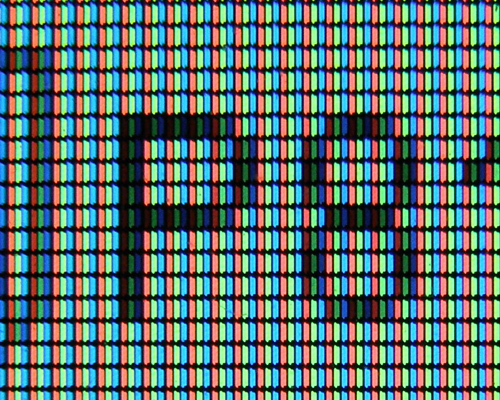
Image result for pixelA pixel is a point on a raster image, with each point being a sample of an original image. The more samples there are, the more accurate the image looks like. They are also the smallest controllable picture elements on the screen. Colours in the pixels are generally represented by RGB; red, green and blue. Cyan, magenta, yellow and black are also often used. Pixels are often represented using dots and squares. However, they are not actual squares or dots, they are just rendered that way.
In this picture we can see that the pixels are represented by coloured rectangles.
Pixel Intensity
Each pixel has a pixel value that describes what colour it should be and how bright the pixel is. With greyscale images, the value is a single number between 0(black) and 255(white). The values in between show different shades of grey, as well as the intensity of the pixel. With coloured pixels, each pixel has to be specified a different colour, which means the pixel value is made up of three numbers, each with a different intensity.
TEENAGE MUTANT NINJA TURTLES
Characters
Hero: Donatello, Rafael, Leonardo, Michelangelo, Splinter, April O’Neil

Villain: Shredder, The Foot Clan, Scientist Sacks

Plot
Beginning: A reporter by the name of April O’Neil is in investigating stolen cargo, with the mysterious Foot Clan behind it. She witnesses the foot clan at the docks. The docks and containers provide a good dark and effective ambush area. Shredder first appears but is kept in the shadows to keep up the suspense. Change in pace as action increases. Many people running away from foot clan attack in the underground metro. Reporter investigates and is taken hostage. Lights go out so the turtles cannot be seen as they beat the clan. Reporter finds and confronts turtles. The turtles are quite comedic and their attitude counters the previous serious tone of the hostage situation. April realises she knows the turtles as they used to be her pets and they were experimented on. April tries to get her boss to follow up on the story, but is rebuffed and fired. In the sewers Splinter, master of the turtles, remembers April and realises she is in danger. He then orders the turtles to find her and bring her to the sewers. April goes to the scientist that created the turtles. A bit of backstory about the scientist living in Japan. Invitation by the turtles to meet, they take her to their sewers. Splinter tells her about how they survived and mutated in the sewers.

Middle: We find out about the scientist working for Shredder, which is quite ironic as April initially trusted Sacks. Splinter informs us about Shredder being Sacks’ master. The underground lair is compromised as April had a tracking device on her person. Shredder and his henchmen attack the lair, with Shredder severely wounding Splinter and three of the turtles being captured and taken to a scientific facility. The atmosphere is quite dramatic and emotional when Splinter is being beaten up, and Rafael is trying unsuccessfully to help Splinter. Rafael and April travel to the scientific institute to rescue the other turtles. Rafael confronts Shredder in a boss type fight whilst April sets the turtles free. They then proceed to Manhattan, as Shredder has released the toxin that will poison New York City. As they do this they fight with the clan down the side of a mountain. When they arrive at the tower, the turtles go to confront Shredder at the top of the tower whilst April confronts the Scientist Sacks. The turtles try and fail to take on Shredder one-by-one. Eventually they all attack him together and with their combined talents, defeat him. Meanwhile, April takes the mutagen and stops the virus from being spread in New York City.

End: Shredder, April and the Turtles all fall off the tower as the top of it collapses, with Shredder landing particularly hard, with his fate left ambiguous, whilst he is surrounded by police and civilians. April and the Turtles go back into the sewers where they heal Splinter revel in their victory.

Setting
Set in New York City, specifically Manhattan.

Gamification:

I think that a third-person 3D action-based game would fit with the theme of the film quite well. It would be photo-realistic with cut-scenes to help progress the story along. The game would be both single- and multiplayer based, with AI controlling the turtles that the player is not controlling. Other players can join and take control of the AI turtles. The player would also be able to switch between characters, with different parts of the game only being accessible to certain controllable characters. For example, there could be an area that can only be unlocked by Donatello. It would be kind of similar to the LEGO series of games, character-wise.

Monday, 26 September 2016

Unit 78
Computer Games Graphics
P1-Understand Theory and Applications of Digital Graphics

Pixel Art:
Pixel art is most often done in 2D using raster graphics software, where the image is created at a pixel level. The design was particularly used in older games due to the limitations in technology at the time. Sprites are two-dimensional bitmaps that are designed to be apart of a larger image. Sometimes they are animated, sometimes they aren't. They can be characters, objects or icons on the UI. They are mostly used now for mobile games or small indie games. Isometric views in pixel art means that the objects look 3D, but is still in 2D, whereas non-isometric is clearly 2D. The picture to the top right shows 2D versions of Sonic in his different poses.
The other picture on the right shows Fez, a 2D platforming game using isometric pixel art. However, it is soon realised that the game levels are in fact 3D.


Concept Art:
Concept art is used as the basis for the characters, environments and items that will appear in the game. It can give the designers more ideas as they develop their illustrations. The art can also be presented to the developers and media, to give an idea as to what the finished game could look like. This also means that the art can be constructively criticised and the artists can use that criticism to build upon their current illustrations. In this picture we can see that the artist is clearly creating artwork for a fantasy-based game. 


Texture and Background Graphics:
Textures are what the surfaces of objects look and feel like in the game. They can be both 3D and 2D and help immerse the player in the games. Textures are also more commonly used in the foreground of an image, in the parts where the user is more likely to be looking, whereas background graphics are used in the parts of the image that the user will be less likely to look at.
Background graphics are what the background looks like, for example in the image to the right, each of the four columns has different textures. On the columns you can see that they are made of stone, concrete, brick and metal, and just by looking at them you could almost tell what they feel like.
In the assassins creed picture on the right, you can see that the textures in the foreground are very well detailed. Comparably, the background is less refined and 'duller' than the foreground.


Head-Up Display(HUD):
The Head-Up Display is how information is displayed in-game, as well as being used to display several pieces of information at once, such as a health bar, items and a mini map.
Most of these pieces of information are static and stay visible during gameplay. Common features include: health/lives, weapons/ammunition, capabilities such as spells and special abilities; menus to exit, change options/settings etc; a mini-map, the players current score/money/lap or level. In some games there is also a quest arrow/compass. For example, the picture above shows the Diablo II inventory, with health in the big red globe, usable potions to the right of it, mini-map on the bottom left. Weapons and armour are on the centre-left of the screen.

Print Media:
Print media is how the game is advertised and presented to the public. If the advertisement appeals to the public eye, it is more likely to sell well. The forms of print media are: game packaging, posters, box cover and manuals.
Game packaging is used for shop display and protection of the contents, Aside from the game itself many items are included, such as instruction manual, upcoming game teasers and various other advertisements and any other hardware needed for the game. It always features box art on it.
The box cover(or box art) is usually flashy and original, to attract potential users into buying it. Also, screenshots on the back show pre-rendered shots of the game. They are generally the game equivalent of film posters.
Game manuals can be any size, from a single double-sided A5 page to a booklet 50 pages long. These always contain information about the gameplay, game mechanics and tutorials. It is also quite common for screenshots to be included, sometimes in colour, sometimes in black and white.
In the picture, we see that there is cover art on the game packaging, an art book with concept art inside, as well as the audio soundtrack and the game itself. The manual has in it pre-rendered images and screenshots of the main character.


Raster Images:
BMP: Bitmap's are used to store digital images without the use of a graphics card. They are stored as pixels that are assigned a colour and put together to form the image. They are used because, despite their slightly larger size compared to JPEG's, they are of a generally better quality.
GIF: A GIF is a collection of moving bitmaps to make up an image or animation. They are used to create a simple logo or animation in a game.
TIFF: A TIFF is used to store raster graphic images in one file, for example holding, JPEG's or BMP's in a compressed format.
JPEG: A JPEG is a compressed file format for digital images, usually those taken with digital cameras. Compression can also be altered, thus changing file size and picture quality.

Vector Images:
PSD: A PSD file is a layered image file used in Photoshop, which the default format for saving data in that program. It allows user's to alter the individual layers even after the image has been saved. The file can then be converted to JPEG or GIF files and shared around.
WMF: A WMF is the primary graphics display file used in Microsoft Office programs, such as Word or PowerPoint, and is used to display the images in those programs.
FLA: FLA files are used by Adobe Flash applications for use on the Web. The files usually contain animations created with Adobe Flash.
AI: AI file formats are used in Adobe Illustrator to help convert the images used in Illustrator to different file formats.


Sunday, 18 September 2016

Level 3 Games Design.
Unit 78: Digital Graphics for Computer Games.
Artistic Styles.

Photo-realism
Photo-realism is a highly detailed type of art style that tries to make the artwork as realistic as possible by using different mediums. The reason for this is to make the game more immersive and to give the user's a better, more realistic experience. This style is usually the most serious out of the art styles used, as it is based on real life models and textures.
It is a very demanding style, due to the complex modelling and textures needed to get it right.
An example of photo-realism is The Witcher 3, which uses very realistic models.


Exaggerated
Exaggerated art is slightly similar to photo-realism, however the art style is enhanced to a point where it would not be possible for such models to realistically exist. This gives developers more artistic freedom when creating their models and textures and makes the player more interested in the game. For example, in the Batman Arkham Series, Batman looks realistically male, but is overly muscular to fit in with the role of the batman we all know. Another example is in the Soul Calibur games, where many of the weapons and characters are somewhat unrealistic in their size and shape.


Abstract
The Abstract art style is the most unique as it does not resemble any of the other art styles or even anything remotely human.. The style is generally made up of geometric shapes with either very vivid or very relaxed colours.
This style is incredibly relaxed and does not require the huge amount of time and skill that photo-realism needs. Abstract is normally used when developers want to stand out from the crowd. However, the style is really only used in mini-games, arcade games and in the alpha stage of development. An example is Geometry Wars, which is nothing more that a collection of geometric shapes.


Cel-Shaded
Cel-shading is something that is not commonly done in video games, although there have been some very popular ones over the years. This style is primarily used to create games that are based off of cartoons or, in the case of TellTale games, comic books. The style thus makes the various games look hand drawn, like in comic books. An example is The Wolf Among Us, by TellTale games.


Pixel
Pixel art is a quite a basic form of game art that was very popular in games from the 80' and 90's, when 3D art software was still in its infancy. It is (was) primarily used in older video games, although many game designers still use it in modern day developing, with Broforce being a very popluar game released in 2015.